

When you create OG images for your website, you want them to look good.
This is especially true for Open Graph (OG) images. As they indicate to potential viewers what your webpage is about, you need to do them right.
However, creating high-quality images can challenging. You could spend time on it yourself, or spend money on a designer. Both have their drawbacks and leave you wondering – is there an alternative?
The answer is yes, and the alternative is automatic image generation. This involves using tools, like DynaPictures Open Graph Generator, to create OG images for you.
With DynaPictures, creating high-quality images is simple. To help you out, we covered the details below.
What is an Open Graph image?
Before we jump into generating OG images, what exactly are they?
In short, Open Graph images are specific images that show what your web page is about. They are used on social networks as a thumbnail image. It previews your webpage to potential viewers.
OG:image, defined by the Open Graph Protocol, is often eye-catching and simple. They indicate the type of content they link to. These images are often used on X, Facebook, LinkedIn, and other social media. They are also used as blog thumbnails.
How does an OG image work?
Meta tags are the key to custom OG images, separating them from typical webpage visuals. They are used to link a specific image to the webpage content you create.
For example, let’s imagine you write a new article on your website. You create a thumbnail for the article, indicating what it is about. So, if your article is shared on another platform, you expect the thumbnail to appear, right?
Well, this is what meta tags are for. Using your HTML code, you can link a specific image to your article. This tells other platforms or networks what image to display when the article is shared. So, if a reader shares your article on Facebook, your image will appear too.
Key Aspects of an OG Image
There are four key elements of an og:image to consider. This includes:
- OG Image – The specific image used to represent your webpage content.
- OG Title – The title of your content.
- OG Type – The type of content your webpage displays.
- OG URL – The URL of the webpage.
Format is key too. The most common OG image size is 1200 X 630 pixels (px), with a 1.91:1 aspect ratio. The file type is JPEG or PNG. This ensures your OG image displays properly when shared on social media.
How to Use Our Free Open Graph Image Generator
Once you understand the basics of OG images, you can start creating them. Dynamic generation is the key to efficiently creating your OG images. With DynaPictures, this is made simple.
There are 3 key steps to generating OG images.
1. Choose an OG Image template
Before you create your OG images, you need to choose an OG image template. Once you have signed up and begin the creation process, you will see the template library.

Media library with image templates
DynaPictures offers a dynamic range of OG image templates to choose from. These could be flyers for events, banners for Tweets, or more. Consider what type of content you are making, and what message you are sending out. This will help you pick the right template.
Pick the template that suits you best. Whatever you need, DynaPictures has a template to get you started. These templates work for X (Twitter), Facebook, WhatsApp OpenGraph images, and more.
2. Add your content
Once you have chosen your template, you can customize it. Our image generation tool with API is simple and easy to use. You can check out how DynaPictures compares to image generation platforms in 2024 to see the difference.
With no-code features, anyone can use this tool to customize their OG images. Various design options are included to help you personalize your image accordingly. These include, but are not limited to, changing font, colors, text size, orientation, and more.
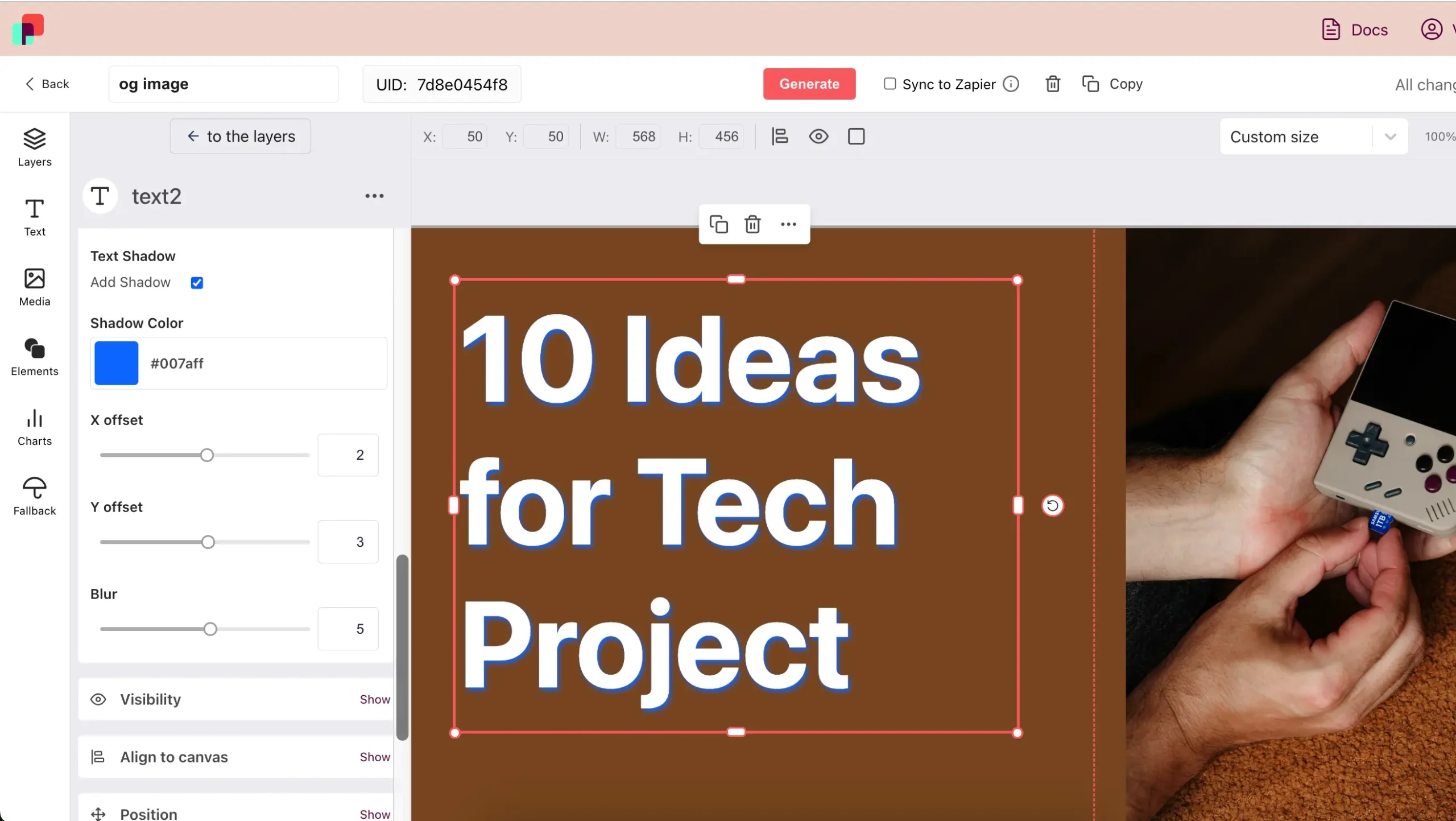
Design of an og image
You can also save your final design as a template. This will help with simple and speedy bulk automation in the future.
3. Generate an OG Image
Now you have your design, it’s time to create images for pages. After clicking generate, you will see options to generate images via form, spreadsheet, API, or URL. There is also an option to integrate a widget. Pick what method suits you best.

Generating og images in bulk via Spreadsheet
For beginners, generating via form is a great way to get started. With a preview, you can see what your image will look like as you change its attributes. Check everything looks good, and click generate.
Once you’re done, you can download it. You can produce multiple variations of the same template, just change the details and generate them again. Making a batch of visuals is possible using generation from a spreadsheet.
Scale OG Image Creation
Now you know how to automatically generate dynamic OG images with DynaPictures, it’s time to start scaling up.
Consider how many images you need and how often.
Also, consider what type of content you plan on producing. This will help you determine the level of image processing you can expect. Once this is decided, you can auto-generate images.
Use Google Forms, Excel, spreadsheet, or no-code tools with DynaPictures. This allows you to create an open graph library of custom images.
Open Graph Image in WordPress
If you want to use your OG images generated by DynaPictures in your WordPress site, you can.
Currently, the best way to do this is via a plugin. Some notable plugins include Yoast SEO or Rank Math. After installing, configure the social settings to enable Open Graph image tags on your images. Here, you can assign image tags to your OG images.
You can also manually add your image tags by editing the header.php. Advanced users can also add OG tags by modifying the functions.php file.
However, for users unfamiliar with the technical side of WordPress, plug-ins are the way forward. These plug-ins will allow you to dynamically generate open graph images with ease.
Summary
In short, the DynaPictures OG Image Generator is your key to producing high-quality images. Not only this, but you can produce high-quality images in bulk with ease.
With this process, you can revolutionize your image creation process. Simply create your image, customize it as you wish, and add the meta tags. Whether you want one image or one hundred – DynaPictures can help.
Open Graph images have never been easier. Get started by creating your OG images today with DynaPictures.
FAQ
An OG image is a specific image that together with metadata indicates what your page or post is about. It’s used on social networks as a thumbnail or preview. OG images are defined in the HTML code of your webpage. Once defined, anytime your webpage is shared on social media or other sites, the OG image will dynamically appear. If you want to automatically generate OG images, then sign up for DynaPictures today!
Yes, Twitter uses Open Graph images. If you share a webpage URL to Twitter, it automatically creates a thumbnail once posted. This thumbnail is the OG image for the webpage that has been chosen by its creator. Many other social media sites use OG images, including Facebook and LinkedIn. However, Twitter (X) has specific Twitter Cards. Twitter Card images are designed to be engaging and include rich media such as videos or photos.
The best size for an open graph image is 1200 x 630 pixels (px), with a 1.91:1 aspect ratio. This is the most common dimension used for OG images that work best on social media. The format is typically JPEG or PNG. These are the standard attributes of a dynamic image.
To find out how to generate an Open Graph image – check out DynaPictures. Our tool lets you pick a template for your visuals, customize it, and automate bulk production. It’s a simple process requiring no designer or programming skills and it saves you time and money.
To create dynamic OG images try DynaPictures. First, you need to establish what your webpage is about. Perhaps it’s an article or blog about a certain topic or conversation. Whatever your webpage is about, it needs to show in your OG image. When your readers share a link to your web pages via URLs, the image will appear as its thumbnail.
Use templates to get started and save hours of designing the image yourself. Simply take a template and customize it, tailoring it to what your webpage is about. Make it simple but eye-catching so that potential viewers are drawn in. Generate dynamic open graph images with DynaPictures today!
The Open Graph Protocol, originally developed by Facebook, improves the visibility of webpages when they’re shared on social media. By creating OG meta tags (such as title, description, etc) images for a webpage will appear when shared online. These meta tags do not directly impact search rankings, but boost visibility, click-through rates (CTR), and engagement.
If you don’t have an image on your page, it doesn’t mean you can have a preview card. When your blog or website page is shared, you can still add opengraph images to show up when it’s seen. These featured images can enhance your online presence, and can ultimately increase social media sharing.
