
Replace a background with AI
Upload a photo up to 15 MB, describe the new background in one or two sentences and click Generate.
Pick the model, keep the subject, change the scene
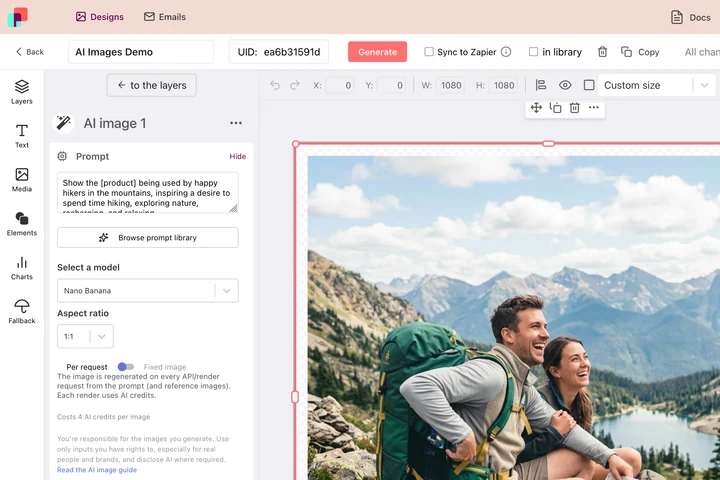
A new background is rarely needed once: it is needed for every person on a team page, every item in a range and every location you sell in. In DynaPictures you choose the model and the aspect ratio for that job, attach reference images the prompt calls by name, and render one image per row of your data.
- Nano Banana Pro, FLUX Kontext or GPT Image 2
- Reference images called by name in the prompt
- One row of data, one finished image
How to replace a background with AI
Upload a photo
PNG or JPG up to 15 MB. The tool works with people, pets, products and objects as long as the subject is clearly visible.
Describe the new background
Write what you want behind the subject, for example a bright coworking space with plants or a soft blue studio gradient. Short, concrete descriptions work best.
Generate and save
The AI keeps the subject and generates the scene around it. Download the PNG; it stays available for 24 hours.
Why change backgrounds with this AI tool
Any background you can describe
No fixed library. Type a place, a color or a mood and the AI builds it, so every image can have a different setting.
Subject preserved
The person, pet or object is kept as photographed; only the surroundings are generated.
Consistent team photos
Run several headshots with the same description to get matching backgrounds for an about page or LinkedIn.
Free, no login
3 free generations per day, shared across the AI tools, no watermark and no account needed.
Fast results
Fast, low-cost models return the new background in seconds instead of minutes.
How the AI background changer works and where it fails
The model separates the subject from the original background and paints a new scene from your description, matching light and perspective as well as it can. Because it uses fast, low-cost models, edges around hair, glasses or fur can be rough, and shadows may not match the new scene. If the first result is off, retry with a shorter or more specific description; each attempt counts as one generation.
Free limits
3 AI generations per day per visitor, shared with the other AI tools. Uploads up to 15 MB. Results are kept for 24 hours.
Automation at scale
The daily limit and the 24 hour storage are the same for every visitor. If you replace backgrounds regularly, the DynaPictures platform renders them from your own templates through the API, Zapier or Make.
Privacy
The photo is used only to generate the new image and is deleted together with the result after 24 hours.
Frequently asked questions
Yes. Every visitor gets 3 free AI generations per day, shared across all DynaPictures AI tools, with no login and no watermark.