
Create your Open Graph image
Enter title, subtitle and site name, pick a style and colors, add a logo up to 5 MB and download the 1200x630 PNG.
One card design, one image URL, a preview per page
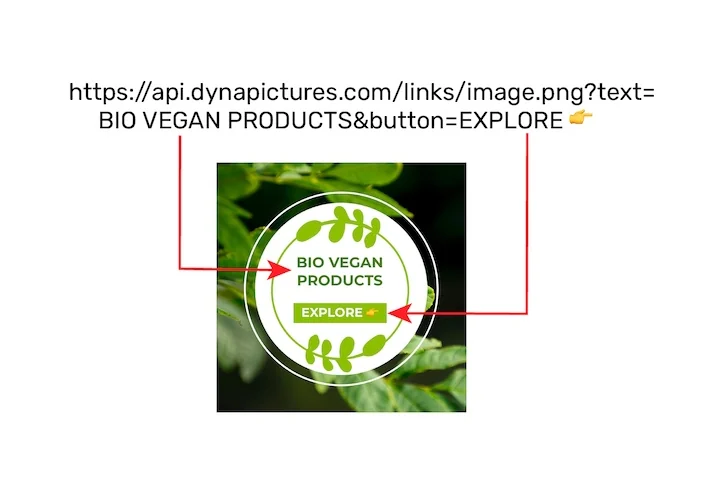
A share preview is part of publishing: every article and landing page needs a card carrying its own title, its own author and the same house style. DynaPictures turns one design into an image URL that accepts up to 20 named values, so your CMS appends the title and the render comes back cached.
- One image URL carrying up to 20 values
- Repeat opens served from cache
- Title and author swapped per page
How to generate an Open Graph image
Enter the text
Type the page title, an optional subtitle and your site name. Long titles wrap automatically and the font size adapts to fit the 1200x630 canvas.
Pick a style and add your logo
Choose one of six layouts, set the brand colors and upload a PNG or JPG logo up to 5 MB. The preview updates as you type.
Download and add the tag
Save the 1200x630 PNG, upload it to your site or your CMS media library and put its full HTTPS address in the og:image tag of the page.
Why generate OG images here
Exactly 1200x630 pixels
The output matches the 1.91:1 size Facebook, LinkedIn and X recommend, so the image is shown full width instead of being cropped to a small square.
One file for every network
Facebook, LinkedIn, Slack, Discord and WhatsApp build their link cards from the same og:image tag, and X falls back to it, so one PNG covers every place the link is shared.
Six styles, your colors, your logo
Gradient, dark, light, split, bold and minimal layouts, each with editable background, accent and text colors and a logo slot for PNG or JPG files up to 5 MB.
Nothing to design
No Figma template, no image editor: the PNG downloads at the exact size the networks ask for, ready to upload.
What makes a good Open Graph image
When a link is shared, Facebook, LinkedIn, X, Slack, Discord and WhatsApp read the og:image tag and show that picture as the card. The safe size is 1200x630 px at a 1.91:1 ratio, at least 600x315 and under 5 MB, served from an absolute HTTPS URL. This generator produces exactly that: a PNG with the title large enough to read on a phone, your logo for recognition and colors that stand out in a feed. Point the tag at the file's full https:// address, not a relative path, since that is what the crawlers expect.
Free limits
20 renders per day per visitor, the same for everyone and reset at midnight UTC; each downloaded PNG stays available for 24 hours.
Every page, automatically
If the og:image is missing across a whole site, DynaPictures generates one per page from your own template through the API, Zapier, Make or a CMS webhook.
Privacy
Logos and rendered PNGs are stored for 24 hours so you can download them, then deleted.
Frequently asked questions
1200x630 pixels (ratio 1.91:1) is the size Facebook, LinkedIn and X recommend and the size this tool renders. Anything smaller than 600x315 may be shown as a small thumbnail instead of a large card.