
Create your menu
Write one dish per line as name | description | price, in up to four sections, pick a look and a size, add your logo or a photo (up to 5 MB each) and download the PDF or PNG.
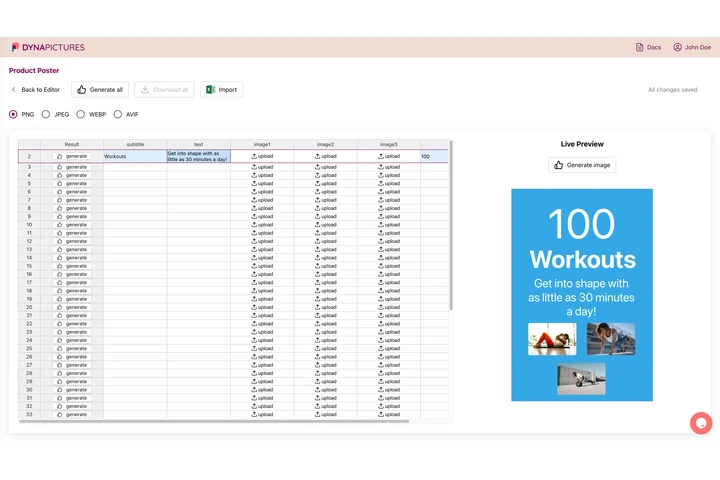
Your menu design, filled from a spreadsheet
A restaurant's menu rarely exists once: there are the week's specials, the lunch card and the branch with other prices. In DynaPictures you design the menu once with the dishes and prices as fields, and each row of a spreadsheet becomes its own menu as a print PDF or an Instagram image, each file named from a column.
- Dishes and prices as template fields
- One spreadsheet row for each version
- PDF for print, PNG for Instagram
The menu maker at a glance
- Price: free, no login, no watermark
- Daily limit: 20 downloads per visitor, reset at midnight UTC; the live preview has its own allowance
- Sizes: A4 and US Letter at 300 DPI as PDF or PNG, Instagram post 1080x1350 and story 1080x1920 as PNG
- Dishes: up to 4 sections of up to 12 dishes, one per line as name | description | price
- Looks: classic menu, modern menu, chalkboard and dish of the day, in your own colors
- Uploads: a logo and a photo, PNG, JPG or WebP up to 5 MB each
- Files kept: 24 hours, then deleted
How to make a restaurant menu
List your dishes
Name up to four sections, such as Starters, Mains, Desserts and Drinks, and type one dish per line: the name, a short description and the price, separated by a vertical bar. Description and price are optional.
Pick a look and a size
Choose a classic menu, a modern one, a chalkboard or a single dish of the day, then A4, US Letter, an Instagram post or a story. Set the currency once and it goes on every price.
Print or post it
Download the PDF and print it, or the PNG to post. A long menu is set in smaller type and two columns so nothing is cut off. The file stays available for 24 hours.
Why make your menu here
Dishes as plain lines
No dragging boxes around: type Burrata | Cherry tomatoes, olive oil | 11.00 and the name, the description and the price land in their places, with dotted leaders on the classic look.
Prices written as guests read them
The currency goes where it belongs: $12.50 in the US, 12,50 € in Germany, R$ 12,90 in Brazil, 45 zł in Poland. A price you type with its own sign is left as it is.
Print and Instagram from one text
A4 and US Letter at 300 DPI as PDF or PNG for the tables, and 1080x1350 posts and 1080x1920 stories for your social channels.
A long menu still fits
Up to 12 dishes in each of four sections: the type gets smaller and, where it helps, the menu moves into two columns, without cutting a single dish.
Free, 20 menus a day
No login and no watermark. Each visitor can download 20 menus a day, reset at midnight UTC.
What makes a menu easy to read
Guests scan a menu in seconds, so structure beats decoration. Group dishes into a few clear sections in the order of the meal, keep descriptions to the ingredients that make the dish and align the prices so they can be compared. Name the restaurant and add one line at the bottom for allergens, opening hours or service charges. For the tables, A4 and US Letter print sharp at 300 DPI; for Instagram, keep a post to a short selection or the dish of the day, since a full menu gets small on a phone. When prices change, update the text and download again.
Free limits
20 downloads per day per visitor, the same for everyone and reset at midnight UTC. One menu per render; the live preview has its own allowance.
Privacy
Logos and photos you upload, and the menus you make, are kept for 24 hours so they can be rendered and downloaded, then deleted.
A design tool, nothing more
The menu maker makes the PDF or the image. It does not take orders, connect to a till or publish the menu online.
Frequently asked questions
Yes, with no login and no watermark. Each visitor can download 20 menus a day, the same for everyone and reset at midnight UTC, and the live preview has its own allowance.