
Create today's special
Write the dish, its description and price, add a photo of the plate (up to 5 MB) and download the post or a printable sign.
Today's special on your website, from one image URL
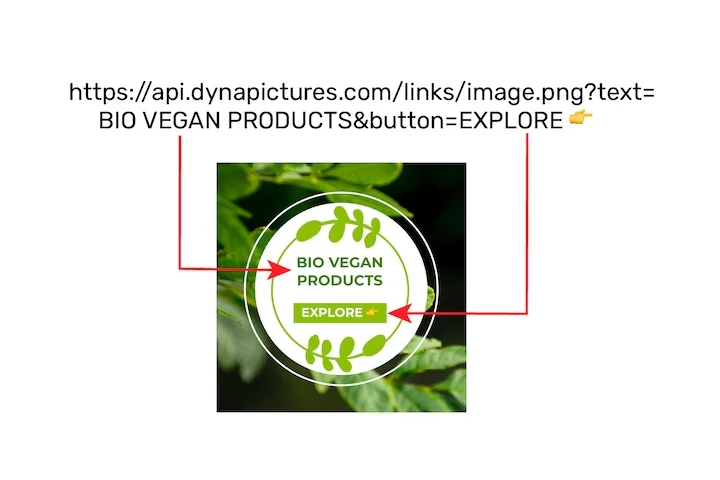
The dish of the day changes every morning, but the place that shows it on your website should not need editing. In DynaPictures your special becomes an image URL whose dish, description and price are named parameters, so the page shows the new special as soon as the values change.
- Dish, description and price as parameters
- One image tag on your website
- The same design as your posts
The daily special board at a glance
- Price: free, no login, no watermark
- Daily limit: 20 downloads per visitor, reset at midnight UTC; the live preview has its own allowance
- Sizes: Instagram post 1080x1350 and story 1080x1920 as PNG; A4 and US Letter at 300 DPI as PDF or PNG
- Date: today's weekday and date in the language of the page, and you can overwrite it
- Layout: the first dish large with its photo and a round price tag, the other dishes of the day listed below
- Uploads: a photo and a logo, PNG, JPG or WebP up to 5 MB each
How to post a daily special
Write today's dish
The first dish of the first section becomes the star: its name, a short description and the price. Add a few more dishes below under a heading such as Also today.
Add a photo of the plate
Upload a photo and it fills the top of the post, with the price in a round tag on its corner. Without a photo the name of the dish is set larger.
Post it or put it in the window
Download the 1080x1350 post or the 1080x1920 story for Instagram, or switch to A4 or Letter for a PDF to print. The file stays available for 24 hours.
Why post your specials with this tool
Today's date, filled in
The board starts with today's weekday and date in your language, so a daily post takes a minute: change the dish, the price and the photo.
Built around one dish
The dish of the day gets the space, in large type with its photo and price tag, and the other dishes of the day sit in a short list underneath.
Set lunches too
Pick the chalkboard look for a two- or three-course lunch with one price: courses without prices are centred under their headings.
A story-safe layout
On a story the words stay clear of the bars Instagram lays over the top and the bottom of the screen.
Free, 20 boards a day
No login and no watermark. Each visitor can download 20 a day, reset at midnight UTC.
Posting a daily special that sells
A daily special works when it is easy to decide on: one dish, one price, a good photo and the hours it is served. Post it before guests plan their lunch, late morning is common, and use the same look every day so regulars recognise it in their feed. Name the dish the way your waiters say it, keep the description to the two or three ingredients that make it, and say when it is gone. The same design can go in the window: print the A4 PDF and swap it when the dish changes.
Free limits
20 downloads per day per visitor, reset at midnight UTC; the live preview has its own allowance.
Privacy
The photos you upload and the boards you make are kept for 24 hours, then deleted.
You post it yourself
The tool makes the image or the PDF; it never connects to your Instagram account or your till.
Frequently asked questions
Yes, with no login and no watermark. Each visitor can download 20 boards a day, reset at midnight UTC, and the live preview has its own allowance.