
Design your signature banner
Fill in the label, event, date and button, add a photo, a logo or both, then download the PNG.
One signature design, one image URL, every teammate's own banner
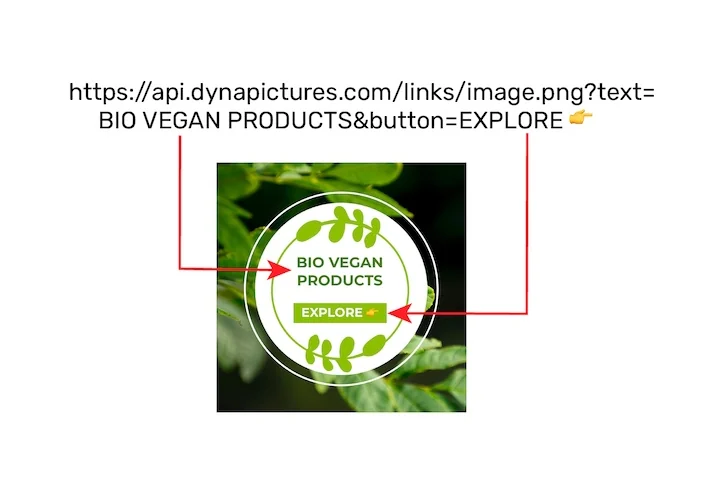
A signature banner works best when the whole team sends one design, each with the event, date and city that apply to them. DynaPictures publishes your own template, in your fonts and colors, as one image URL whose label, event and date are named parameters, so editing the design updates every signature.
- Your own template in your fonts and colors
- Label, event and date passed as URL parameters
- One design edit reaches every teammate's signature
How to create an email signature banner
Write the strip
Type a short label such as Join me at, the event, the date and place and a button text like Save your seat.
Add a photo, a logo or both
Upload a headshot, a logo or both as PNG, JPG or WebP up to 5 MB: the headshot sits on the left as a circle, the logo on the right above the button.
Download and insert the PNG
Pick 600x150 or 600x200, download the PNG, then add it as an image in your email app's signature settings and link it to your event page.
Why make your signature banner here
600 pixels wide
Both sizes match the 600-pixel width most email layouts are built around, so the strip lines up with the message above it.
Two heights
600x150 for a slim strip, 600x200 when the event name is long or a headshot needs more room.
Face and logo in one strip
A round headshot opens the strip on the left and your company logo sits above the button on the right, so readers see who is writing and who they represent.
Type sized for email
The label, event and date are set large, because email apps usually show a signature image at its real pixel size.
Free and without a watermark
20 renders a day per visitor, with nothing added to your design and no account needed.
Email signature banner size and setup
Most email layouts are 600 pixels wide, which is why signature banners are usually 600 pixels across and between 100 and 200 pixels tall; this generator makes 600x150 and 600x200. In your email app, open the signature settings, insert the downloaded PNG as an image and add a link to it so a click opens your event or registration page; the button is part of the picture, so the link covers the whole strip. Some email apps hold back images until the reader allows them, so keep the event date in your text signature as well. When the event changes, make a new PNG and swap the image in the same settings.
Free limits
20 renders and 60 live previews a day per visitor; PNG downloads and uploaded images are deleted after 24 hours.
A logo on dark styles
On a dark background, as in the Gradient, Dark, Split and Bold styles, the logo sits on a small white plate so a dark logo stays readable.
Banners for a whole event
In DynaPictures, the Event Marketing module renders a banner per speaker, sponsor or exhibitor from your list, each shared with its own tracked link.
Email signature banner questions
600 pixels wide and 100 to 200 pixels tall works in most email layouts. This tool makes 600x150 and 600x200, both as PNG.