

Generate images from your spreadsheet
Paste rows or upload a CSV with a header row, map the columns to the template and download the ZIP. Up to 10 rows per batch.
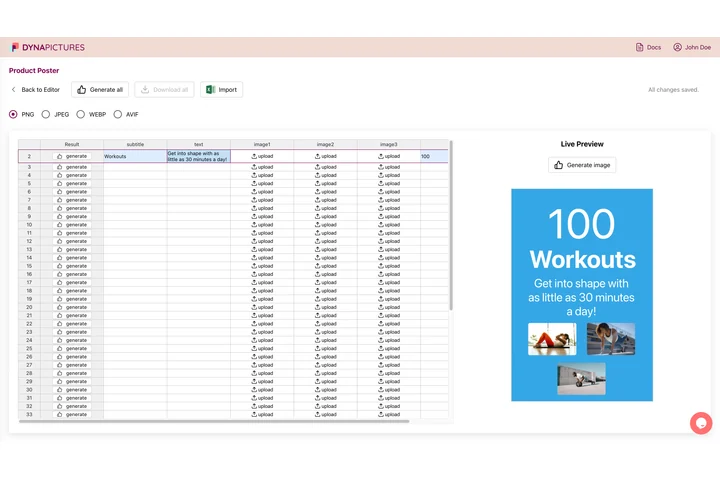
Your sheet on one side, the rendered image on the other
A batch of images is really one design and a table of values: a card per product, a badge per speaker, a certificate per attendee. DynaPictures keeps that table online, takes your CSV or Excel import, renders the whole sheet against your own template and names every file from a column before zipping the run.
- Import CSV or Excel into an online sheet
- Render one row, or the entire sheet
- Every file named from a column you choose
How to generate images from a CSV
Add your data
Upload a CSV whose first row holds the column names, or paste rows copied from Excel or Google Sheets. The free batch takes up to 10 rows.
Map columns to the template
Pick a template style and choose which column fills the title, subtitle, name, price and the other text fields.
Download the ZIP
Click Generate and save the ZIP of PNGs. Files are numbered by row and the download link stays active for 24 hours.
Why generate images in bulk here
One PNG per row
Every spreadsheet row becomes its own image, so 10 rows give you 10 finished PNGs in a single ZIP.
No design work
Choose a ready-made template style; layout, fonts and spacing are handled for you.
Works with any spreadsheet
Export a CSV from Excel, Google Sheets, Airtable or Notion, or paste the rows directly into the tool.
Consistent output
Every image uses the same template, so a price list, a set of quotes or a speaker lineup looks uniform.
Nothing to install
Runs in the browser, needs no account and adds no watermark to the images.
What the bulk image generator does
The tool reads your header row, lets you match each column to a text field of the chosen template and renders one PNG per row on our servers. It is built for small jobs such as a price list, a batch of quote cards or the speakers of an event. Larger batches and your own designs belong to the DynaPictures platform, which renders hundreds of rows from templates you build in the editor and accepts a CSV or XLSX upload, Zapier, Make or the REST API.
Free limits
Up to 10 rows per batch and 1 batch per day per visitor; the ZIP is kept for 24 hours.
Own templates and larger batches
The DynaPictures platform renders hundreds of rows from your own templates and automates the job via API, Zapier or a spreadsheet.
Privacy
Your rows are used only to render the images and are deleted together with the ZIP after 24 hours.
Frequently asked questions
A plain CSV with the column names in the first row. You can also paste rows copied from Excel or Google Sheets; the first pasted line is treated as the header.