
Build your placeholder image URL
Enter the size, pick a format, set text, colors and font size, then copy the URL or the img tag.
The slot you sized in the mockup, filled with real data
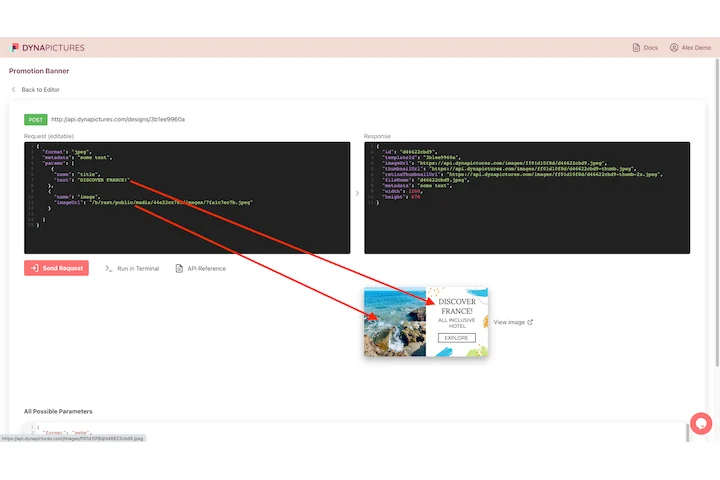
A placeholder holds the space while a layout is being built, and each of those slots eventually has to carry a real picture, one per product or per user. DynaPictures draws that picture from a template built at the dimensions you planned for: post your values as JSON and the response is a hosted file you can link to.
- One JSON request, one hosted file back
- Any size your layout was designed around
- Served as PNG, JPEG, WEBP or AVIF
How to create a dummy image
Set the dimensions
Type width and height in pixels, for example 600x400 or 1200x630. Anything up to 4000x4000 px works.
Choose text and colors
Add a label such as the size or a product name, then set the background (bg) and text (fg) colors as hex values and a font size if you like.
Copy the URL
Pick PNG, JPG, WebP or SVG and copy the link or the ready-made img tag into your HTML, CSS or design tool.
Why use this placeholder image generator
Everything in the URL
Size, format, text and colors are query parameters, so you can write the link by hand or generate it in a loop.
Four formats
PNG, JPG, WebP or SVG from the same URL pattern, just change the extension.
Up to 4000x4000 px
Large enough for hero sections, print mockups and retina test images.
Permanent links
Placeholder URLs have no view cap and no expiry, so fixtures and mockups keep working.
Fast to reason about
The URL tells you exactly what the image is; no uploads, no accounts, no watermark.
How the placeholder URL works
The path carries the size and format, /tools/placeholder/600x400.png, and the query string carries the look: text= for the label, bg= and fg= for the background and text colors as hex without a hash sign, and a font size parameter. The URL builder on this page runs in your browser and only assembles the link; the image itself is rendered by our servers on request. Placeholders are permanent and uncapped and only rate limited per IP. When a mockup turns into a real product image, the DynaPictures platform renders your own templates with photos, fonts and live data through the API, Zapier or Make.
Limits
Sizes up to 4000x4000 px in PNG, JPG, WebP or SVG. No daily limit and no view cap, only per-IP rate limiting.
From placeholder to real image
The DynaPictures platform turns the same idea into dynamic images from your own design, generated via API, Zapier or spreadsheets.
Colors and text
Use 3 or 6 digit hex colors without a hash sign and URL-encode text with spaces as %20.
<img src="https://api.dynapictures.com/tools/placeholder/600x400.png?text=Hello&bg=e2e8f0&fg=1e293b" width="600" height="400" alt="Placeholder">Frequently asked questions
Up to 4000x4000 px in any of the four formats. Smaller sizes such as 300x250 or 1200x630 are just as valid.