
Build your progress bar
Enter a value from 0 to 100, a label and colors, pick a size, then download the PNG.
The number moves in the URL, the whole card redraws
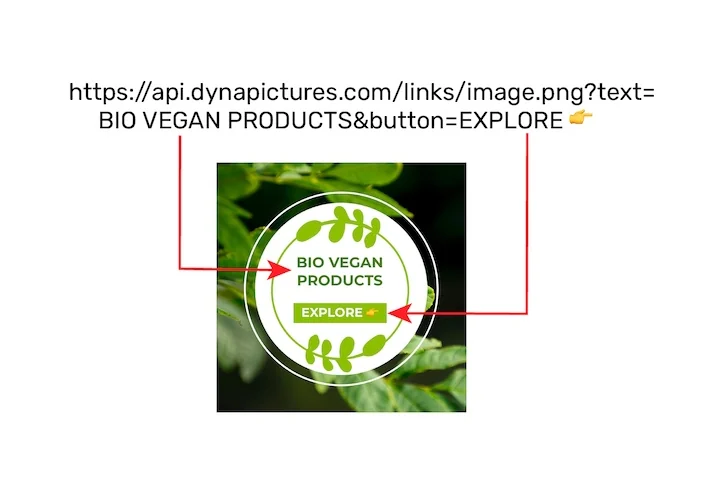
A percentage on its own says little: the card around it has to name the goal, the team it belongs to and the date it is measured against. Publish that card from DynaPictures as an image URL, pass the value and the days remaining as named parameters, and the bar, the labels and your brand colors are drawn on request.
- A progress bar layer inside your card
- Value and deadline passed as URL parameters
- Fill, track and labels in your brand colors
How to create a progress bar image
Set the value
Type a number from 0 to 100. It becomes the filled part of the bar and can be shown as a percentage next to the label.
Style it
Choose the bar, track and background colors as hex values, type a label such as Sprint 14 and pick 600x80, 600x120 or 300x40 pixels.
Download the PNG
Save the image and add it to a Notion image block, a Slack message, a README or an email; when your number moves, render a fresh bar.
Why use this progress bar generator
Works in Notion
Notion has no progress bar image of its own; upload the PNG to an image block and it sits in a page or a column like any picture.
Slack, README and email
A PNG goes wherever an image does: Slack messages, GitHub READMEs, HTML emails, slide decks and status pages.
A track that stays visible
Leave the track color empty and it is drawn light grey on a light background and slate on a dark one, so the unfilled part never vanishes.
Your brand colors
Bar, track and background colors take hex values, so the bar matches your dashboard or newsletter.
Three sizes
600x80 for a slim bar, 600x120 with room for a label above it, 300x40 for a table cell or a sidebar.
Progress bar sizes, labels and colors
The value you type sets the filled share of the bar and is drawn as a whole percentage. With a label, the label sits above the bar on the left and the percentage on the right; without one, the percentage sits on the bar itself, on its larger part and in a color that contrasts with it, so 5% and 95% stay legible. Values below 0 or above 100 are clamped to an empty or a full bar. The download is a PNG at the exact pixel size you picked, which keeps the edges sharp in a 600 px email column or a Notion page.
Free limits
20 renders per day per visitor; each PNG download is kept for 24 hours, then deleted.
Automate the value
The DynaPictures platform updates the value from Zapier, Make, an uploaded spreadsheet or the API, using a template of your own.
Label or percentage
A label of up to 60 characters goes above the bar with the percentage beside it; leave it empty for a percentage on the bar.
Frequently asked questions
Download the PNG, type /image on a Notion page and upload the file, or drag it onto the page. When progress changes, render a new bar and replace the image.