
Build your dynamic image URL
Pick a style, type the values for each parameter, watch the live preview and copy the URL or the HTML tag.
One URL, up to 20 named values, your own design behind it
A parameterized image URL is how a system that can only place an image tag shows something specific: an email, a README, a chat card. DynaPictures publishes your own template at one such address, accepts up to 20 named values in the query string, and serves the second open from cache instead of drawing it again.
- Your own template behind one image URL
- Up to 20 named parameters per request
- The second open is served from cache
How to create an image from URL parameters
Pick a template style
Choose one of the ready-made layouts. Each exposes text fields such as title and subtitle plus background and text colors.
Fill the parameters
Type sample values for the fields. The preview re-renders live so you can check line breaks and contrast.
Copy the URL
Copy the finished link or the img tag. Replace any value in the query string later and the served PNG follows.
Why build images from a URL
Query string is the API
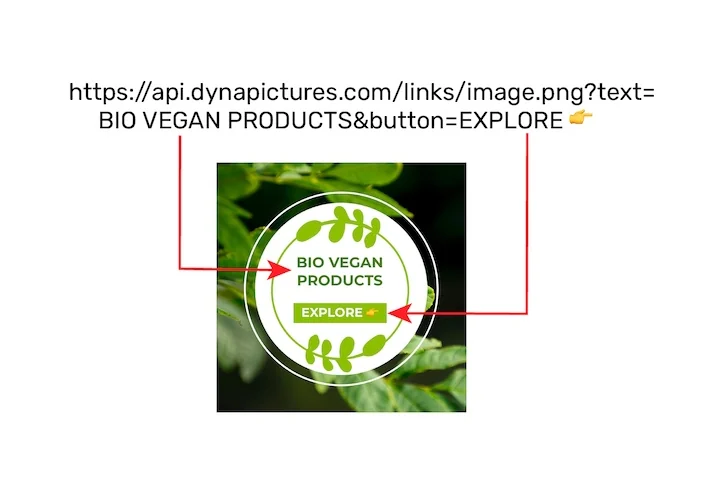
Every text and color lives in the URL, so ?title=Weekly%20report is all the integration you need.
Works wherever images work
Paste the link into an email, a Notion page, a README, a Slack message or any HTML img tag.
Rendered on our servers
You get a real PNG with proper fonts, not client-side canvas, so it looks the same in every viewer.
Live preview
See the result while you edit the parameters, before copying anything.
Nothing to install
No SDK, no API key and no login for the free tool.
How the dynamic image URL works
Each template has an id and a set of named parameters. When a browser or email client requests /tools/d/YOUR-ID.png with a query string, our renderer fills the template with those values and returns a PNG. Values must be URL-encoded, so a space becomes %20. The free tool covers text and colors from a fixed set of styles; on the DynaPictures platform you design your own template in the editor, add images and fonts, and call the same mechanism through a full REST API, Zapier or Make.
Free limits
20 previews per day per visitor. A URL stays live for 30 days and up to 1,000 opens, at most 100 of them per UTC day.
Your own templates
On the DynaPictures platform, any design you build in the editor becomes a dynamic image URL or an API call, with images and fonts of your own.
Encoding tips
Encode spaces as %20 and special characters with encodeURIComponent; keep colors as hex without the hash sign.
<img src="https://api.dynapictures.com/tools/d/YOUR-ID.png?title=Weekly%20report&subtitle=42%20signups" alt="Weekly report">Frequently asked questions
A link to a PNG whose content is generated on request from the query parameters. Change ?title=A to ?title=B and you get a different image at a different address.