
Convert your HTML to an image
Paste up to 100 KB of HTML and CSS, choose width, height, scale and format, then click Render.
One design, named fields, a rendered image per request
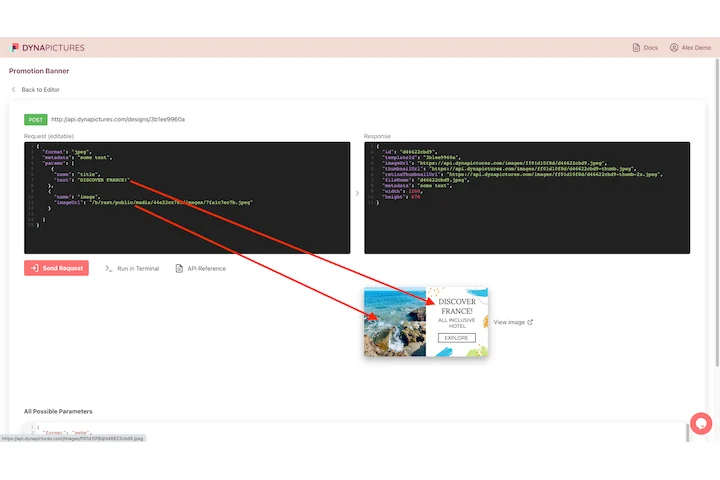
Markup gets turned into a picture because something further down the line needs one: an open graph card, a receipt, a certificate issued at signup. DynaPictures keeps that layout as a template whose text, colors and images are named fields, and a single REST call returns the finished file in under 300 ms.
- Text, image and color fields per layer
- POST a JSON payload, receive the image
- PNG, JPEG, WEBP, AVIF, PDF and PPTX
How to convert HTML to PNG or JPG
Paste HTML and CSS
Drop your markup into the editor, inline styles or a style block included. Up to 100 KB per render; Google Fonts links are allowed.
Set size and format
Choose width and height in pixels, 1x or 2x device scale for sharp retina output, and PNG, JPG or WebP as the format.
Render and download
Click Render. The image appears in a few seconds and the download link stays live for 24 hours.
Why use this HTML to image converter
Real browser rendering
Your HTML is laid out by headless Chromium, so CSS grid, flexbox, shadows and gradients render exactly as in a browser.
Retina-ready output
Pick 2x device scale to get an image with twice the pixel density for crisp text on high-DPI screens.
Three output formats
Export PNG when you need transparency, JPG for photos and small files, or WebP for modern web pages.
Sandboxed and safe
JavaScript is disabled and only Google Fonts can be loaded from outside, so nothing runs and nothing leaks.
How the HTML to image conversion works
The tool loads your markup in a sandboxed headless browser at the viewport you choose, waits for fonts to load and captures the page as a bitmap. JavaScript is disabled and external requests other than Google Fonts are blocked, which keeps rendering fast and predictable. The result is the same as a screenshot of that HTML, but at exactly the size and scale you asked for.
Free limits
20 renders per day per visitor, up to 100 KB of HTML and CSS per render, downloads kept for 24 hours.
Rendering from code
The daily limit is the same for every visitor. The DynaPictures platform is the other route: render your own templates through the API, Zapier or Make, or fill one from a spreadsheet.
Fonts and assets
Link Google Fonts in your HTML; other external stylesheets, scripts and images are blocked in the free tool, so inline them or use data URLs.
Frequently asked questions
Paste the HTML in the editor, choose PNG as the format, set the width and height and click Render. The download starts from the result panel.