
Take a screenshot of a website
Paste a public URL, choose the device width and full page or above the fold, then click Capture.
Send the capture, get back the finished branded graphic
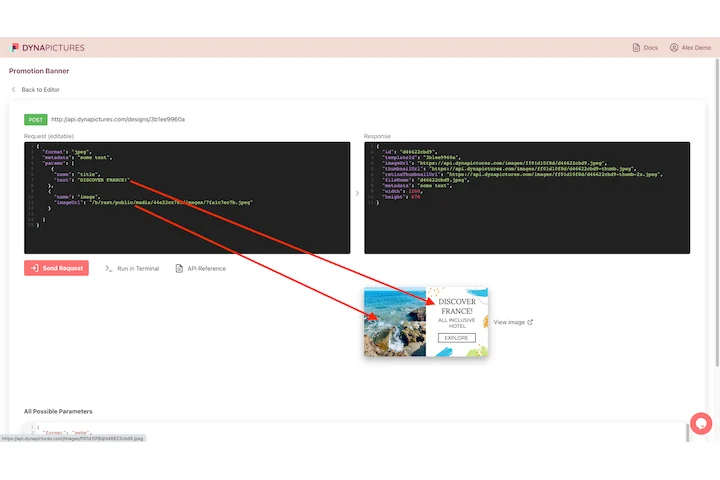
A screenshot is rarely the deliverable: it ends up in a release note, a docs header or a launch post, under a title and beside your logo. In DynaPictures the capture is an image layer you sized and pinned yourself, so one API call passes its address along with the heading and returns the composed graphic.
- The capture arrives as an image parameter
- Heading, logo and frame fixed by X and Y
- One call returns PNG, JPEG or PDF
How to take a full page screenshot online
Enter the URL
Paste the address of any public page. Sites behind logins, VPNs or localhost cannot be reached by the capture browser.
Pick width and range
Choose desktop (1440), tablet (820) or phone (390) width, then full page for the whole document or above the fold for the first screen only.
Capture and download
Click Capture. Rendering takes up to 15 seconds for heavy pages; save the result as PNG or JPG within 24 hours.
Why capture screenshots with this tool
Full page in one image
The browser scrolls the entire document and stitches it into one tall image, so long landing pages and articles are captured end to end.
Three device widths
Compare how a page renders at 1440, 820 and 390 px without opening a device lab or resizing your own browser window.
No browser extension
Everything runs on our servers, so you get identical results on any machine without installing anything.
PNG or JPG
Choose lossless PNG for pixel-exact QA screenshots or JPG for smaller files to attach to tickets and emails.
Real browser rendering
Captures run in the same headless Chromium we use in production, so web fonts, CSS layout and lazy-loaded images look the way a visitor sees them.
How the screenshot is taken
A headless Chromium instance opens the URL at the width you selected, waits for the page to settle and captures the viewport or the full scroll height. Lazy-loaded images are triggered by scrolling before capture, and the page is rendered with a standard desktop or mobile user agent. Only public HTTP and HTTPS pages are allowed and each capture has a 15 second timeout.
Free limits
10 screenshots per day per visitor, public pages only, a 15 second capture timeout, downloads kept for 24 hours.
Limits, and what the platform does instead
The daily limit and the 24 hour retention are the same for every visitor. On the DynaPictures platform you render images from your own templates through the API, Zapier or Make.
Cookie banners and popups
The tool captures the page as a first-time visitor sees it, so consent dialogs may appear. Pages that block headless browsers can fail or render partially.
Frequently asked questions
Paste the URL, choose a device width, switch on full page and click Capture. The tool scrolls the whole document and returns one image of the entire page.