

View your photo's metadata
Drop a JPG, PNG, WebP, HEIC or TIFF up to 15 MB and read its EXIF, GPS and ICC data in a second.
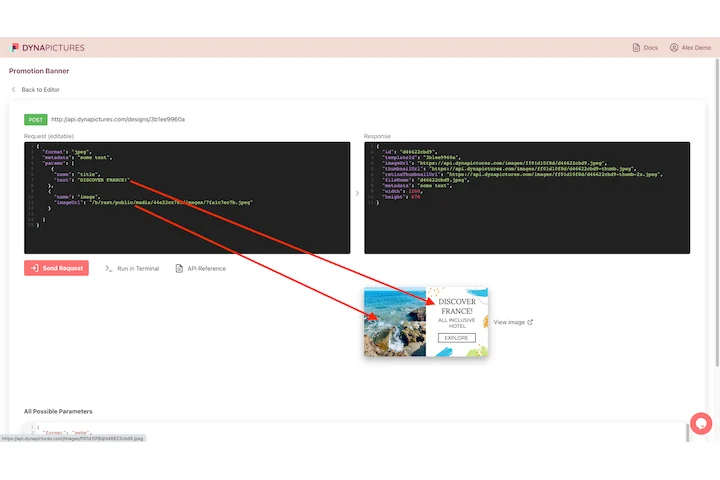
Every rendered image has its request behind it
You read a file's metadata when the file came from somewhere else and you need to know what you are holding. When DynaPictures makes the picture, the description already exists in the API call: the template it used, the values each layer received and the format you asked for.
- The call names the template and its values
- Layer values sent as named JSON fields
- Ask for PNG, JPEG, WEBP, AVIF or PDF
How to view photo metadata online
Upload the image
Drag a file into the box or click to choose it. JPG, PNG, WebP, HEIC and TIFF up to 15 MB are analyzed straight away.
Read the report
The basics first: format, width and height, DPI, color space and ICC profile. Below that every EXIF field found: camera make and model, lens, date, ISO, aperture, shutter speed, focal length and GPS coordinates when present.
Act on what you find
Copy the values you need, or if the photo contains a location or personal details, run it through the EXIF remover before you publish it.
Why check metadata with this viewer
See the GPS before you share
If a photo carries coordinates, the viewer shows them. Many home, product and marketplace photos do, and most people never notice.
Camera settings at a glance
ISO, aperture, shutter speed, focal length, flash and lens model, handy for learning from a shot or crediting equipment correctly.
Print and color facts
DPI, color space (sRGB, Adobe RGB, Display P3) and the ICC profile tell you whether a file is ready for print or will shift colors on the web.
Nothing stored, nothing installed
The file is read, reported and discarded. Works in any browser with 30 free checks per day and no signup.
What the metadata viewer reads
Image files carry several metadata blocks. The header gives the format, dimensions and, for JPG and PNG, a DPI value. EXIF, written by cameras and phones, holds the make, model, lens, date and time, exposure settings, orientation and optionally GPS latitude, longitude and altitude. The ICC profile describes the color space the pixels were saved in. The viewer parses all of them and lists the fields it finds; empty sections mean the file simply does not contain that block, which is normal for screenshots, exports from design tools and images that have already passed through a social network.
Free limits
30 checks per day per visitor and files up to 15 MB. There is no download, so nothing is kept after the report is shown.
Checking images in bulk
Checks are metered per visitor, 30 a day for everyone alike. If you produce images rather than inspect them, DynaPictures renders them from your templates through the API, Zapier or Make.
Privacy
The upload is analyzed in memory and discarded as soon as the report is generated. Neither the file nor its metadata is stored.
Frequently asked questions
Format, pixel dimensions, DPI, color space and ICC profile, plus all EXIF fields present: camera make and model, lens, date and time, ISO, aperture, shutter speed, focal length, flash and GPS coordinates.