
Convert your JPG to WebP
Drop a JPG or JPEG up to 15 MB, choose the quality and download the WebP. Up to 30 conversions per day.
The lighter version exists before the post goes live
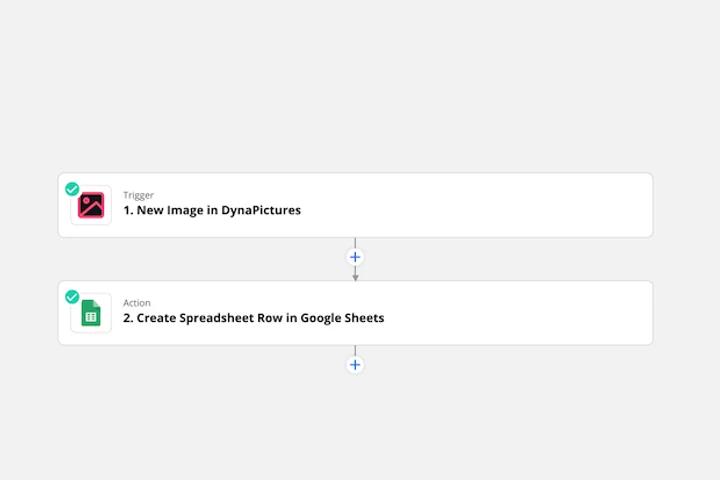
A post needs its header in the same minute it appears, and the record that triggers the publish already holds the title, the byline and the picture. A dedicated Zapier integration ties that record to DynaPictures: the status flips, the render fires, and the finished file lands back on the record.
- A dedicated Zapier integration, plus Make and Pabbly
- Fields filled from the record that fired it
- Render on publish, file back in minutes
How to convert JPG to WebP online
Upload the JPG
Drag a .jpg or .jpeg file into the box or click to pick one. Photos up to 15 MB are accepted.
Set the quality
Quality 75 to 85 is the sweet spot for photos: the WebP stays sharp while the file shrinks. Go higher only for images you will zoom into.
Download the WebP
Save the .webp file and replace the JPG on your site. The download link stays active for 24 hours.
Why convert JPG to WebP
Smaller photos, same look
WebP compresses photographic detail more efficiently than JPEG, so a typical photo lands 25 to 30 percent lighter at equal visual quality.
Quality under your control
One slider decides the balance between file size and sharpness, so a product image and a background photo can get different settings.
Faster product pages
Lighter images shorten load times on mobile connections, which matters for ecommerce galleries with dozens of photos per page.
Handled by any current browser
Chrome, Firefox, Edge and Safari 14 or newer display WebP natively, so the converted photo needs no plugin or JavaScript fallback.
No software, no account
Runs on our servers in any browser. Free, no login, and the WebP carries no watermark.
JPG vs WebP: what changes
JPEG has been the default photo format since the 1990s and every camera, phone and program understands it, but its compression is dated. WebP uses prediction techniques from the VP8 video codec and packs the same photo into a smaller file at the same quality. Neither format has transparency issues here: JPG has no alpha channel, so nothing is lost on the way to WebP. What you should know is that both formats are lossy, so converting a JPG to WebP is a second compression pass. Keep the original JPG as your master and use a quality of 75 or more to avoid visible artifacts. WebP is a web format; older desktop software and some marketplaces still want the JPG.
Free limits
Up to 30 conversions per day per visitor, JPG files up to 15 MB, downloads kept for 24 hours.
Whole galleries
The 30 conversions a day apply to every visitor, signed in or not. When those same photos become published images week after week, DynaPictures builds them from your templates through the API, Zapier or Make.
Privacy
Photos are processed on our servers and deleted together with the download link after 24 hours.
JPG to WebP questions
For photos, typically 25 to 30 percent smaller than the JPG at the same visual quality. The saving depends on the image and the quality you pick; a lower quality saves more.