
Convert your JPG to PNG
Drop a JPG or JPEG up to 15 MB, click Convert and download the PNG. Up to 30 conversions per day.
Your photo becomes one layer in a design you control
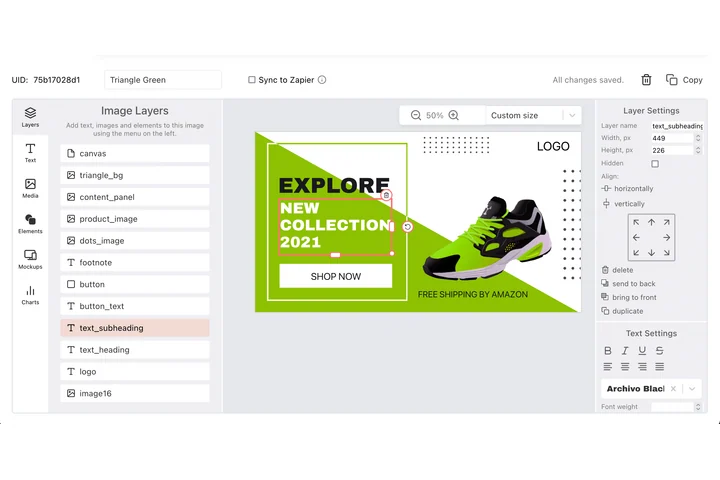
A photo rarely ships alone: it sits under a headline, a logo and a legal line, and each of those has a place it is meant to occupy. The DynaPictures editor keeps them as separate layers with their own X, Y, size and stacking order, and a text layer can shrink to fit the box you drew when a translation runs long.
- Layers with X, Y, size and stacking order
- Text that shrinks to fit its box
- Rotation and align-to-canvas on any layer
How to convert JPG to PNG online
Upload the JPG
Drag a .jpg or .jpeg file into the box or click to pick one. Photos and scans up to 15 MB are accepted.
Click Convert
There are no settings to tune: PNG is lossless, so the decoded JPEG pixels are written exactly as they are, without another compression pass.
Download the PNG
Save the .png file and open it in your editor or upload it. The download link stays active for 24 hours.
Why convert JPG to PNG
No more generation loss
Every time a JPG is edited and saved it is compressed again. A PNG stays pixel-identical through any number of crops, annotations and saves.
Ready for transparency
PNG has an alpha channel, so once the photo is a PNG you can erase the background in any editor and keep the cut-out transparent.
Meets PNG-only requirements
App icons, logo upload fields, design tools and some CMS plugins accept PNG only. This converter gets a JPG through those forms.
Clean text on every re-save
Screenshots and scans with text are better kept as PNG, because the format never adds the blocky artifacts JPEG creates around letters on each re-save.
No software, no account
Runs on our servers in any browser. Free, no login, and the PNG carries no watermark.
JPG vs PNG: what actually changes
JPEG is a lossy photo format: it reaches small files by discarding detail, and that detail is gone for good. PNG is lossless and supports transparency, but it compresses photos poorly, so a converted file is usually two to five times larger than the JPG. Converting does not restore quality: compression artifacts already baked into the JPG remain visible in the PNG. What you gain is a stable master that will not degrade further, a format that editors and upload forms accept without complaint, and the option to add a transparent background later. Use the PNG for editing and archiving, and go back to JPG or WebP when file size matters again.
Free limits
Up to 30 conversions per day per visitor, JPG files up to 15 MB, downloads kept for 24 hours.
Bulk and automation
The daily allowance is 30 files and it is the same for every visitor. When PNGs feed a design you rebuild often, DynaPictures renders them from your templates through the API, Zapier or Make.
Privacy
Files are processed on our servers and deleted together with the download link after 24 hours.
JPG to PNG questions
No. The PNG contains exactly the pixels decoded from the JPG, including any compression artifacts. It prevents further loss but cannot recover detail that JPEG already discarded.