
Convert your WebP to PNG
Drop a WebP up to 15 MB, click Convert and download the PNG. Up to 30 conversions per day.
One template, and the API returns the format you asked for
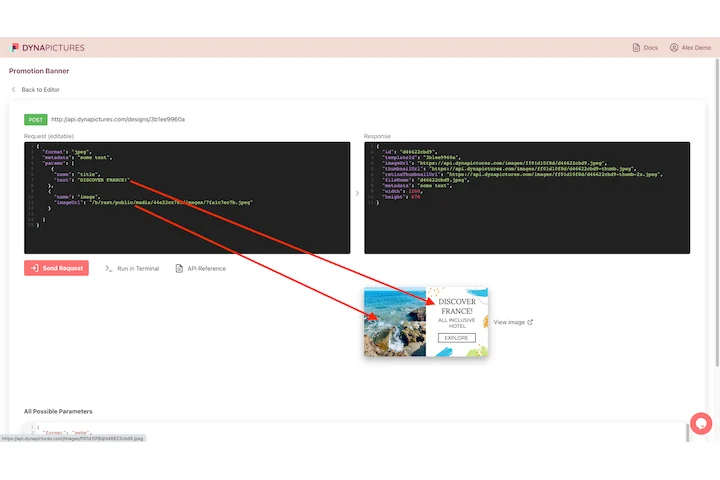
A PNG is usually needed because something downstream insists on it: a CMS field, a slide deck, an editor that reads nothing newer. DynaPictures renders that asset from your own template when your app asks for it, and the same design comes back as PNG, JPEG, WEBP, AVIF, PDF or PPTX.
- POST your values, receive the rendered file
- The same design as PNG, PDF or PPTX
- Layers pinned by X and Y every render
How to convert WebP to PNG online
Upload the WebP
Drag a .webp file into the box or click to pick one. Files up to 15 MB are accepted.
Click Convert
There is nothing to configure: PNG is lossless, so the decoded pixels are stored exactly and the alpha channel is kept.
Download the PNG
Save the file to your computer. The download link stays active for 24 hours.
Why convert WebP to PNG
Opens everywhere
PNG is read by every image editor, by Office and Google Docs, by CMS media libraries and print shops, while WebP still fails in older tools.
Transparency preserved
Logos and cut-outs with a transparent background keep their alpha channel, so you can place the PNG on any color.
No quality loss
PNG is a lossless format: the conversion stores every pixel of the decoded WebP without a second compression pass.
No software, no account
Runs on our servers in any browser. Free, no login, and the PNG carries no watermark.
WebP vs PNG: what changes
WebP is the format most websites serve because it is 25 to 35 percent smaller than PNG at the same visual quality, which is why images you save from a web page often arrive as .webp. PNG is older, larger and supported by practically every program, so it is the safer choice for editing, presentations, email attachments and upload forms that reject WebP. Expect the PNG to be noticeably bigger than the source; the pixels themselves are unchanged.
Free limits
Up to 30 conversions per day per visitor, WebP files up to 15 MB, downloads kept for 24 hours.
Batches and automation
The daily count is per visitor and the same for everyone. When the PNGs are part of a bigger job, DynaPictures renders them from your templates through the API, Zapier or Make.
Privacy
Files are processed on our servers and deleted together with the download link after 24 hours.
WebP to PNG questions
Yes. The alpha channel of the WebP is written into the PNG unchanged, so transparent logos and stickers stay transparent.