
Resize your image
Drop a JPG, PNG, WebP, GIF or AVIF up to 15 MB, enter the new size and download the result.
One image URL, the right size for every channel
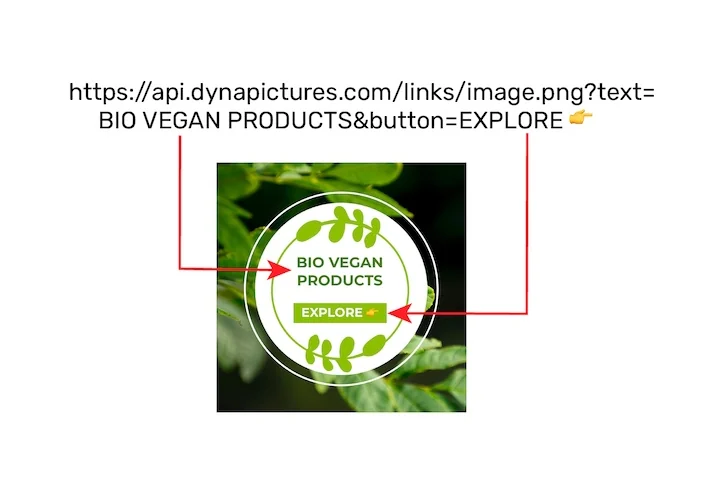
The same photo has to appear as a post, a story, an email header and a thumbnail, each at the dimensions that platform expects. DynaPictures keeps a template per size and fills them from named values in the image URL, cached so a second open costs nothing.
- 20 named values ride along in the URL
- Cached, so a repeat open skips the render
- A template per channel, unlimited templates
How to resize an image online
Upload the image
Drag a JPG, PNG, WebP, GIF or AVIF into the box or click to choose it. Files up to 15 MB are accepted and the current pixel size is shown.
Enter the new size
Type a width, a height or both, in pixels or as a percentage such as 50%. Then pick the fit: keep ratio (default), stretch to the exact box, or cover, which crops the excess.
Download
Click Convert and save the file. It keeps its original format and the download link stays active for 24 hours.
Why resize photos with this tool
Pixels or percent
Enter 1200 px for a blog hero or 50% to halve a screenshot; leave one dimension empty and it is calculated from the aspect ratio.
Three fit modes
Keep ratio for photos, stretch when a form demands exact dimensions, or cover to crop into a fixed box such as 1080x1080 without distortion.
Format stays the same
A PNG stays a PNG with its transparency, a WebP stays a WebP and an animated GIF is resized frame by frame.
Smaller files as a bonus
Bringing a 4000 px camera photo down to 1600 px usually cuts the file size by 80 percent or more, which helps page speed and email deliverability.
Nothing to install
Works in any browser on Windows, Mac, Linux and phones. Free, no login, no watermark.
What happens when you resize
The resizer scales the pixels with a high-quality filter, so downscaling stays sharp and upscaling avoids jagged edges, although enlarging beyond about 200 percent will always look soft because no new detail exists. With keep ratio, the image is scaled until it fits inside the width and height you gave. With stretch, it is forced to those exact numbers. With cover, it is scaled to fill the box and the overflow is cropped from the edges. The output is written in the same format at the same quality level, and metadata such as the color profile is preserved.
Free limits
Up to 30 resizes per day per visitor, files up to 15 MB in JPG, PNG, WebP, GIF or AVIF, downloads kept for 24 hours.
Many images or automation
Results stay available for 24 hours and the daily limit is the same for every visitor. For sizes you need over and over, DynaPictures renders each one from a template via the API, Zapier, Make or a spreadsheet. For up to 10 files at once try the bulk image resizer.
Privacy
Uploads are processed on our servers and deleted with the download link after 24 hours.
Image resizing questions
Enter only one dimension, or keep the fit set to keep ratio. The other side is calculated automatically and nothing is stretched.