
Resize your Facebook cover photo
Upload a photo or banner up to 15 MB and download an 820x312 PNG ready for your Page or profile.
One cover design, one address per Page
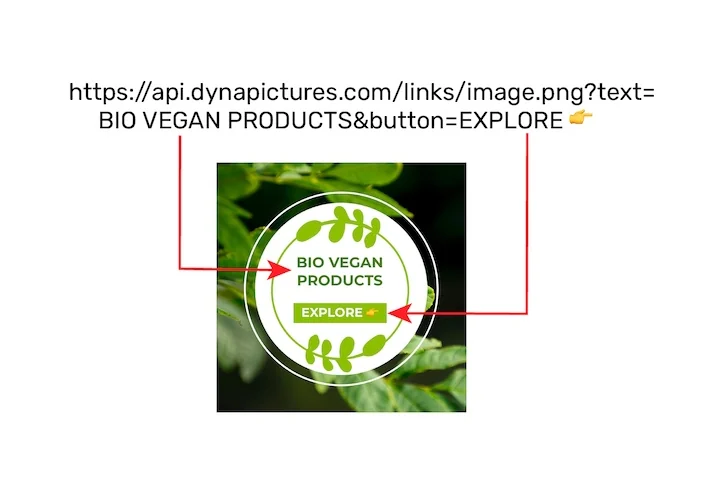
A Page cover carries the brand and the local detail at the same time: the same design on every branch Page, each showing that branch's address and hours. In DynaPictures that is one 820x312 template behind a single image URL that takes 20 named values, one set per Page.
- One image URL, 20 named values inside
- One 820x312 template behind every branch
- Repeat opens answered from the cache
How to resize a Facebook cover photo
Choose a wide image
Pick a photo at least 820 px wide, ideally much larger, so the 2.63:1 strip stays sharp. Files up to 15 MB are accepted.
Tick Facebook cover
Select the 820x312 preset. The crop is placed around detected faces; for landscapes and patterns it is centered horizontally.
Upload to Facebook
Download the PNG and use Edit cover photo on your Page or profile. Facebook will not ask you to reposition it because the ratio already matches.
Why resize your cover here
Exact 820x312 output
The desktop display size Facebook uses for Pages and profiles, so nothing is rescaled or shifted after upload.
Mobile crop accounted for
Phones show a 640x360 window that trims about 90 px from each side. Face detection keeps people in the central band that both layouts share.
PNG for crisp text
Facebook recommends PNG for covers that include a logo or lettering; the tool outputs PNG by default.
Profile picture overlap avoided
On desktop the round profile picture sits over the bottom left of the cover. Keeping the subject centered means it is never hidden behind the avatar.
Free, 20 covers a day
Enough for a seasonal refresh across several Pages, with no account or watermark required.
Facebook cover photo dimensions in detail
Facebook displays a cover photo at 820 px wide by 312 px tall on desktop and at 640 px wide by 360 px tall on smartphones. It refuses images smaller than 400x150 and suggests uploading an sRGB file around 851x315 for the fastest load; a PNG is best when the cover contains text or a logo, a JPG under 100 KB when it is a plain photograph. Because the phone layout is taller relative to its width, the sides of a desktop-optimised cover are cut on mobile while extra space appears at the top and bottom. This tool produces the 820x312 desktop version and steers the crop so that detected faces stay inside the central area visible in both views.
Free tool limits
One upload up to 15 MB per run, 20 runs per day, PNG output kept for 24 hours before deletion.
Covers for many Pages
The daily limit applies per visitor, with no exceptions. When covers need to go out for many Pages at once, DynaPictures builds them from a template through the API, Zapier, Make or a spreadsheet.
Where the cover is shown
Across the top of a personal profile, a business Page, a group and an event; groups and events use different ratios (1640x856 and 1920x1005), so use this preset only for profiles and Pages.
Facebook cover photo size FAQ
820x312 pixels on desktop and 640x360 on mobile. The minimum accepted upload is 400x150 and this tool exports the 820x312 desktop version.