
Resize your image for Instagram
Upload a JPG, PNG or WebP up to 15 MB, pick square or portrait and download the finished post image.
One sheet in, a month of 1080x1080 squares out
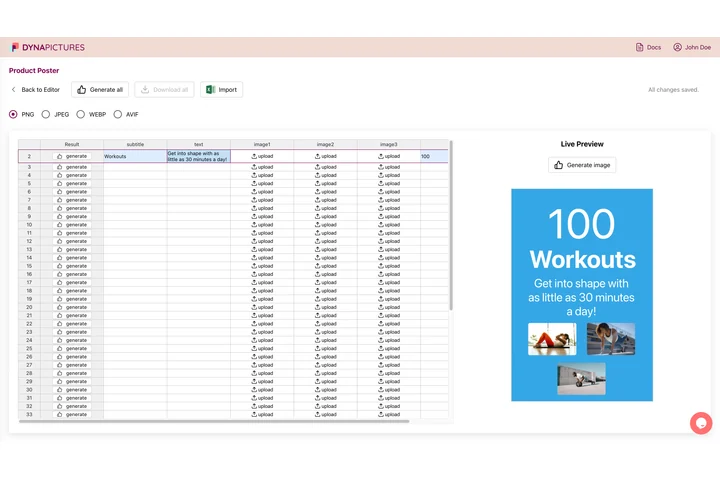
A feed is read as a grid, so a square post belongs to a series that is planned well before the week it appears in. DynaPictures keeps that plan as an online spreadsheet: one row per post, one 1080x1080 template, and the whole sheet rendered in a single pass.
- One row per post, one 1080x1080 template
- Bring the calendar in as CSV or Excel
- Export names taken from any column you pick
How to resize an image for an Instagram post
Add your photo
Drop a picture from your camera roll or a design export. Anything up to 15 MB works, and a wide landscape shot is fine because the tool will reframe it.
Pick square or portrait
Choose 1080x1080 for the classic square, 1080x1350 for the taller 4:5 format that fills more of the feed, or tick both to compare.
Save and post
Download the PNG (or a ZIP when you picked both sizes), send it to your phone and publish. The file is available for 24 hours.
Why use this Instagram post resizer
Both feed formats
1:1 at 1080x1080 and 4:5 at 1080x1350, the two ratios Instagram displays at full width in the feed.
Faces stay in the frame
When a landscape group photo becomes a square, the crop window slides to keep every detected face inside the 1080 px edge.
No double compression
Instagram downsizes anything wider than 1080 px. Uploading at exactly 1080 px avoids that second pass and keeps text and edges crisp.
Carousel-ready
Every slide in a carousel takes the ratio of the first one, so resizing all pictures to the same preset prevents surprise crops on slides 2 to 10.
Free, 20 posts a day
Twenty resizes per day, no watermark, no account. Enough for a full week of content in one sitting.
Instagram post dimensions explained
Instagram shows feed posts at 1080 px wide. A square is 1080x1080, a portrait is 1080x1350 (ratio 4:5) and a landscape is 1080x566 (1.91:1). Portrait posts take up the most screen on a phone, which is why most brands use them. The profile grid displays a cropped preview of each post, so keep the subject away from the very top and bottom of a 4:5 image. The resizer scales your picture to cover the chosen size and then positions the crop around detected faces; nothing is stretched or padded.
Accepted input
One JPG, PNG or WebP up to 15 MB per run. Output is always a PNG at 1080x1080 or 1080x1350, ready to upload through the app or a scheduler.
Beyond 20 a day
Results are metered per visitor, 20 runs a day for everyone alike. If Instagram images are a weekly job, DynaPictures produces them from a spreadsheet, Zapier, Make or the API.
What Instagram accepts
JPG and PNG uploads, ratios from 4:5 to 1.91:1 in the feed, and a 1080 px width before Instagram compresses the file itself.
Instagram post size questions
Square posts are 1080x1080 px (1:1), portrait posts 1080x1350 px (4:5) and landscape posts 1080x566 px (1.91:1). This tool offers the square and portrait presets, which are the ones that fill the feed.