

Create your certificate
Enter your organisation and the recipient, choose a style and a size, then download a PDF for printing or a PNG.
One certificate per row, in your own design
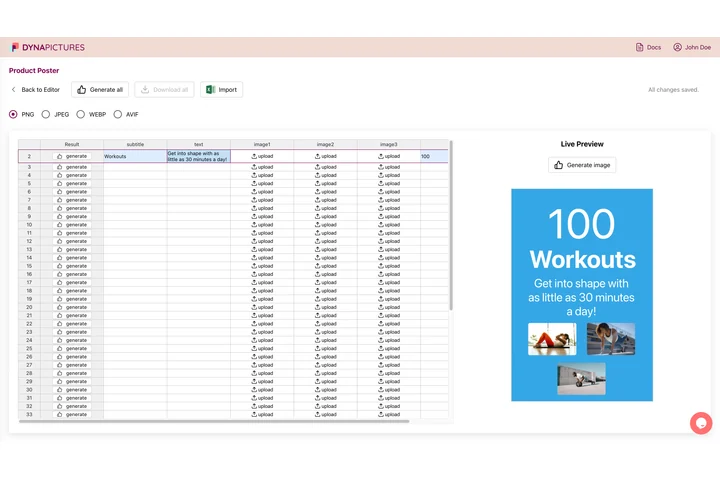
Certificates usually go out to a whole list at once: a class at the end of term, a cohort after the last session, a team at the annual awards. In DynaPictures you design the certificate once, import the list as CSV or Excel and generate a print-ready PDF for every row, each file named after the person.
- CSV or Excel into an online spreadsheet
- A print-ready PDF for every row
- File names taken from a column
Create a certificate in three steps
Enter who awards it
Type your organisation's name, which is printed at the top and needed for the download, and add your logo as a PNG, JPG or WebP up to 5 MB.
Fill in the certificate
Add the title, the line above the name, the recipient, what the certificate is for and the date, then up to two signatories with their roles.
Pick a style and download
Choose one of six styles or your own colours, a print size or the email size, and download a PDF for printing or a PNG.
Certificate templates by occasion
Each occasion has its own page with designs and wording to copy, and the maker on that page opens with the wording already filled in.
Recognition at work
- Certificate of appreciation Thank-you certificates for staff, volunteers, teachers and partners, with wording ideas and six designs.
- Certificate of recognition Recognition for honor students, top performers and outstanding leaders, with sample wording and six designs.
- Award certificate Certificates for first place, best in category and company awards, with wording for every kind of winner.
- Employee of the month certificate A monthly award with the winner's photo above the name, six designs and wording for every kind of team.
- Volunteer certificate Thank volunteers and record their hours, role and dates, with six designs and wording for every kind of cause.
- Years of service certificate Milestone certificates for work anniversaries, long service awards and retirements, with wording by year.
- Appreciation for speakers Thank guest speakers, resource speakers and panelists with wording that names the talk, the topic and the event.
Courses, training and events
- Certificate of completion For learners who finished your course or programme: completion wording with hours, six designs and a print-ready PDF.
- Training certificate For workshops and staff training on any subject: the course, its hours and the trainer on six print-ready designs.
- Certificate of participation For everyone who took part in your workshop, webinar, seminar, conference or competition, with wording and six designs.
Schools, clubs and sports
- Certificate of achievement School and classroom certificates for goals reached, excellence, merit and personal bests, with wording ideas.
- Sports certificate Certificates for sports day winners, tournament teams and club players, with wording for every placing.
- Membership certificate Welcome new members of a club, society or association, with wording for life, honorary and founding members.
- Student of the month certificate Monthly classroom awards for kindness, effort and leadership, plus honor roll and star student wording.
Built for schools, trainers, clubs and teams
Real print sizes
A4 landscape, A4 portrait and US Letter landscape at 300 DPI, as a PDF with the true page size or as a PNG.
Your organisation on it
Your name and logo at the top, and up to two signatories, each with a line to sign on and the typed name and role underneath.
Six styles, your colours
Classic, Elegant, Modern, Minimal, Playful and Sports, each with a background, accent and text colour you can change.
A whole list at once
A CSV of up to 10 names, reasons and dates gives one PDF with a page per person, or a ZIP of PNGs.
A version for the inbox
A 2000x1414 PNG to attach to a congratulations email or to share on LinkedIn.
Free, no login
20 certificates a day per visitor, and your files stay available for 24 hours.
What you can make here, and what you can't
It makes the certificates an organisation awards to its own people: completed courses and workshops, prizes, thanks to volunteers and partners, staff recognition and participation in its events. The organisation's name is required and printed at the top, and documents that only another body may issue are refused. A certificate made here records your recognition; it is not an accredited qualification. A small line at the bottom of the frame reads Created with DynaPictures · dynapictures.com/tools, and nothing else is added to your design.
Free limits
20 certificates and 60 live previews a day per visitor, and one CSV batch a day. Files are deleted after 24 hours.
Signing by hand
Each signatory gets a line to sign on, with the typed name and role underneath: print the certificate and sign it with a pen.
Printing
The PDF has the real A4 or Letter page size, so print it at actual size, on card or heavy paper for a certificate that lasts.
Certificate maker questions
Yes, and it needs no login: 20 certificates a day per visitor, one CSV batch of up to 10 people a day, and every file stays available for 24 hours.