
Add text to your photo
Drop an image up to 15 MB, type the text, style it and download a PNG or JPG.
The words change with the URL, the layout does not
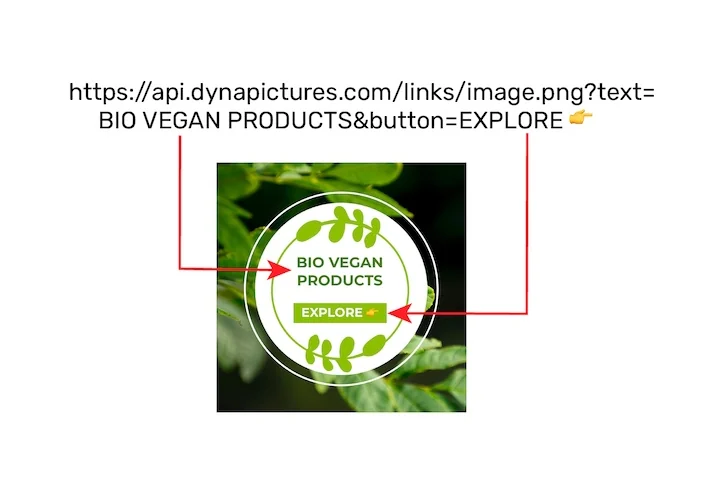
Text on a picture almost always carries the part that differs every time: a name, a price, a quote, the title of the post that just went live. In DynaPictures you draw the text box once, pick a font, and pass the words as a named value in the image URL, with auto-resize shrinking a long line to fit.
- The words arrive as a URL parameter
- Auto-resize keeps a long value inside the box
- 1,000+ Google Fonts and your own font files
How to add text to a photo online
Upload the image
Drag a photo, screenshot or graphic into the box or click to choose it. Files up to 15 MB are accepted.
Type and style the text
Enter your caption, pick sans, serif, mono or display, set the size and color, and turn on an outline so the text stays readable over busy backgrounds.
Place it and download
Choose one of 9 anchor positions (corners, edges or centre), then save the image as PNG or JPG. The download link stays active for 24 hours.
Why add text with this tool
Four font families
Sans for clean labels, serif for quotes, mono for code or prices and display for bold headlines, all rendered on the server so the result looks the same everywhere.
Outline for readability
An outline in a contrasting color keeps white text legible over a bright sky or a dark product shot without editing the photo.
Nine positions
Anchor the text to any corner, edge or the centre of the image, so a credit line sits bottom right while a title sits top centre.
PNG or JPG output
Choose PNG to keep transparency and sharp edges, or JPG for a smaller file to send by email or upload to a listing.
Nothing to install
Runs in any browser on desktop or phone, 30 free images per day, no signup.
What you can do with the text tool
The tool renders your text on the server with a real font, so the letters stay crisp at the size you set and you do not depend on the fonts installed on your device. Typical uses: captions on social photos, a price or SKU on a product shot, a date on an event photo, a title on a blog header, or a short quote on a background image. Position, size and outline are set once per image; for many images with the same layout and changing text, an account with templates does the job automatically.
Free limits
30 images per day per visitor, uploads up to 15 MB, downloads available for 24 hours.
Same layout on hundreds of images
Results stay available for 24 hours and the daily limit is per visitor, the same for everyone. To put the same text layout on hundreds of pictures, the DynaPictures platform renders them from a spreadsheet, the API, Zapier or Make.
Privacy
Uploads are processed in memory and deleted together with the download link after 24 hours.
Frequently asked questions
Four families: sans, serif, mono and display. Your own brand fonts can be uploaded and used in the DynaPictures editor, which is a separate product from this tool.