
Put the sale text on your photo
Upload a product shot or a banner background up to 15 MB, type the offer, pick Display for heavy headline type and place it where the photo has room.
A sale banner for every product in the catalog
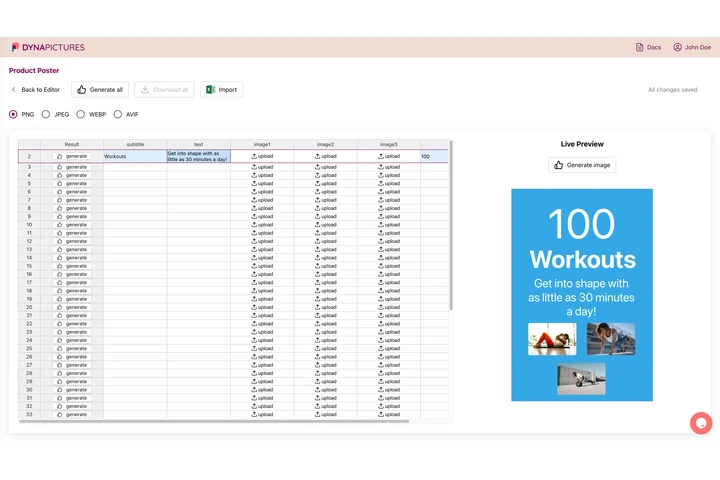
A sale rarely covers one product: each item needs its own photo, price and discount, and the set changes with every promotion. In DynaPictures the old price, the new price and the percentage are columns of a spreadsheet, so one banner template renders the whole sale, each file named after its product.
- Prices and discounts as spreadsheet columns
- Each row brings its own product photo
- PNG, JPG, WEBP or AVIF output
Sale banner maker at a glance
- Price: free, no login, no watermark
- Daily limit: 30 images per visitor; resets at midnight UTC
- Upload: JPG, PNG, WebP, HEIC, AVIF and other common image formats, up to 15 MB
- Text: one line of up to 200 characters, set in bold, such as SALE, 30% OFF or a price
- Type: four styles (sans, serif, mono, display), 8 to 400 px, any text color and an optional outline color
- Opacity and position: opacity from 10% to 100%; 9 anchors at the corners, the edges and the center
- Output: PNG or JPG at the photo's own pixel size, kept for 24 hours
How to make a sale banner
Upload the product photo
Use a product shot, a lifestyle photo or a plain colored background, up to 15 MB. Leave room in a corner or along an edge for the offer.
Type the offer and style it
Write SALE, 30% OFF, a price or a deadline, choose Display for heavy headline type and set a size that fills the free area; an outline keeps it readable on any background.
Place it and download
Pick the corner, edge or center over a calm part of the photo, then save a PNG for the web or a JPG for a smaller file.
Why make sale banners this way
Your own photo
The banner starts from your product shot or campaign image, so it looks like your shop, not a stock template.
Bold, outlined type
Display type with a contrasting outline stays legible on bright products and busy backgrounds alike.
Sized for the offer
Anything from a small price in a corner to a 30% OFF across the whole width, from 8 to 400 px.
No quality loss
The photo keeps its resolution: PNG is lossless, and JPG is saved at quality 92.
Free, no login
30 images a day, no watermark, files removed after 24 hours.
Writing sale text that works on a photo
Keep the offer short: a percentage, a price or two or three words read faster than a sentence, and the tool sets exactly one line. Put the text over a calm area of the photo, use the outline when the background has light and dark parts, and size it so the offer is the first thing people see. For Black Friday, Cyber Monday or a summer sale, make one banner per product photo; each download counts as one of your 30 images that day. For a second line, such as the price under the discount, upload the finished banner again and add it in another position.
Free limits
30 images per visitor per day, uploads up to 15 MB, downloads kept for 24 hours. The count resets at midnight UTC.
A whole catalog on sale
The daily limit is the same for everyone. For a banner per product, DynaPictures renders the full set from a spreadsheet, Zapier, Make or the API.
What stays as it was
The photo keeps its size and crop; only the text is added, so resize it first if a channel needs a fixed format.
Frequently asked questions
Yes, free with no login and no watermark: 30 images per visitor per day, reset at midnight UTC. Uploads can be up to 15 MB, and each download stays available for 24 hours.