
Add your overlay text
Drop the ad image or product shot, type the overlay, set size, color and outline, choose where it sits and download the result.
Overlay copy that stays in its box on every ad
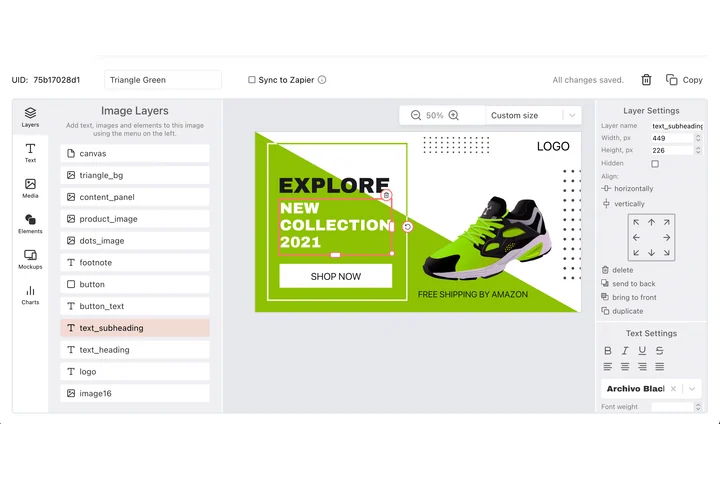
An ad set repeats one message across sizes, audiences and languages, and the overlay has to stay readable on every version. In the DynaPictures template editor the overlay is a text layer with an exact position and your brand fonts, and auto-resize shrinks a longer headline until it fits.
- Text layers placed by X and Y
- Auto-resize for longer headlines
- Brand fonts uploaded once, used everywhere
Text overlay tool at a glance
- Price: free, no login, no watermark
- Daily limit: 30 images per visitor; resets at midnight UTC
- Upload: an ad image, product photo or graphic in JPG, PNG, WebP, HEIC, AVIF or another common format, up to 15 MB
- Overlay text: one line of up to 200 characters, set in bold
- Type and color: sans, serif, mono or display at 8 to 400 px, any text color and an optional outline color
- Opacity: 10% to 100%, from a faint label to a solid headline
- Position: 9 anchors at the corners, the edges and the center, kept off the edge by a margin that grows with the font size
- Output: PNG or JPG at the original pixel size, kept for 24 hours
How to add a text overlay
Upload the ad image
Drop the photo or creative you want to run, up to 15 MB. The overlay is added at the image's own resolution.
Write and style the overlay
Type the headline, offer or call to action, pick a font style and size, then set a text color and an outline color that contrasts with the image.
Anchor it and export
Choose a corner, an edge or the center, run it and download a PNG, or a JPG if the ad platform wants a smaller file. If the first try is off, change a setting and run it again.
Why use this overlay tool for ads
Contrast on any background
An outline in a contrasting color keeps white copy readable over a sky, a shelf or a busy product shot.
Opacity control
Turn the opacity down for a subtle brand line, or keep it at 100% for the headline that has to stop the scroll.
A margin from the edge
Nine anchors keep the overlay a set distance from the edge, in proportion to the font size.
Original resolution
The image keeps its pixel size: PNG output is lossless, and JPG output is saved at quality 92.
Free, no login
30 overlays a day per visitor, no watermark, files deleted after 24 hours.
Text overlays on ads: what to keep in mind
Ads work best when the picture does the work and the text stays short: a headline of a few words, an offer or a call to action reads at a glance in a feed. Keep the overlay away from the edges where buttons and profile names sit on top of the ad, and test a light and a dark version of the same creative. The tool sets one line per run; for a second line, such as a call to action under the headline, upload the downloaded image again and add it in another position.
Free limits
30 images per visitor per day, uploads up to 15 MB, downloads kept for 24 hours. The count resets at midnight UTC.
Every size of an ad set
The daily limit is the same for everyone. DynaPictures renders the same overlay on every size, audience and language of an ad set from one template, through a spreadsheet or the API.
What stays untouched
The overlay is added on top: the image keeps its pixel size and crop, and nothing else in the picture changes.
Frequently asked questions
Yes, free with no login and no watermark: 30 images per visitor per day, reset at midnight UTC. Uploads can be up to 15 MB, and every result stays available to download for 24 hours.