
Make your name tags
The “Hello, my name is” band and the Vivid style are preselected. Type a name, or paste up to 10, one per line, and download a PNG or a ZIP.
Every name on the guest list gets its own tag
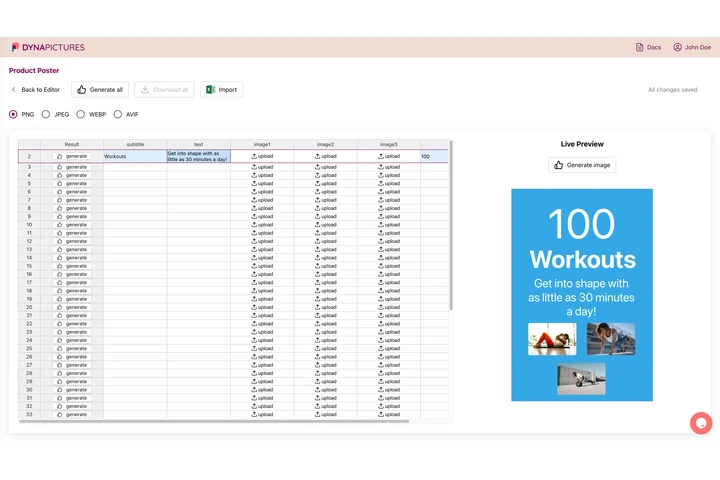
Name tags come out whenever a room fills with people who have not met yet, from a customer meetup to an onboarding week. In DynaPictures you import the guest list as CSV or Excel, press Generate all and download a ZIP with one tag per row, each file named after the person.
- Guest list imported from CSV or Excel
- Generate all: one tag per row
- File names taken from a column
Name tag generator at a glance
- Price: free, no login, no watermark
- Daily limit: 20 downloads per visitor, where a PNG or a ZIP of up to 10 tags counts as one, plus 60 live previews; resets at midnight UTC
- Size: 1200x900 px landscape, that is 4x3 inches at 300 DPI; a 900x1200 portrait version is in the size menu
- Greeting line: the words “Hello, my name is”, preselected in the top band and editable up to 60 characters
- Name: up to 40 characters, set in bold; a long name shrinks to fit
- Styles: 4 styles, Vivid preselected, plus Corporate, Dark and Warm, each with your own background, accent and text colors
- Batch: up to 10 names, one per line as name | role | company, downloaded as a ZIP of PNGs
- Files: kept for 24 hours, then deleted
How to make name tags
Keep or change the top line
The band at the top already says “Hello, my name is”. Keep it, or type your event or company name in the Event field instead.
Type the name and pick colors
Enter the name people should call the wearer, usually a first name. Pick a style and set your own colors; the preview follows every change.
Download and print
Save one tag as a PNG, or paste up to 10 names and get them all in a ZIP. Print each tag at 4x3 inches, or at the size of your label sheet, by setting it in the print dialog.
What makes these name tags work
Readable from across the room
The name takes the middle of the tag in heavy type, the way a marker-written tag would, only sharp and straight.
A greeting everybody knows
The “Hello, my name is” band tells people at once what the tag is for, so introductions start without a question.
Ten names in one go
Paste a short list and download a ZIP with one PNG per person, every tag in the same colors.
Your colors instead of sticker red
Vivid starts with a coral band; switch to Corporate, Dark or Warm, or set your brand's background, accent and text colors.
No account, no watermark
Nothing to sign up for, and the files are deleted after 24 hours.
Printing name tags people can read
Each tag is 1200x900 pixels, enough for a sharp 4x3 inch print at 300 DPI, the size of standard badge holders. Adhesive name labels are often smaller: scale the PNG down in your print dialog or place several tags on a label template in your word processor, and print a test page on plain paper first. The name sits in the middle in bold, so first names and short names get the biggest type; a long name shrinks to fit its line. The band on top carries one line, which reads “Hello, my name is” until you change it.
Free limits
20 downloads and 60 previews per visitor per day, up to 10 tags per ZIP, files kept for 24 hours. The count resets at midnight UTC.
Whole sign-up lists
The daily limit is the same for everyone. For a tag per registration, the DynaPictures platform renders the whole list from a spreadsheet, Zapier or the API.
Logo and photo
Optional: a logo and a photo, PNG, JPG or WebP up to 5 MB each. A batch of several names leaves the photo out, since it belongs to one person.
Frequently asked questions
Yes, with no login and no watermark. Each visitor gets 20 downloads a day, where one PNG or one ZIP of up to 10 tags counts as a download, plus 60 live previews; the count resets at midnight UTC, and the files stay available for 24 hours.