

Remove the background from your photo
Drop a JPG, PNG, WebP, AVIF or HEIC up to 15 MB, choose a transparent or a white background and click Remove background.
Cut-out products, placed on a banner for every listing
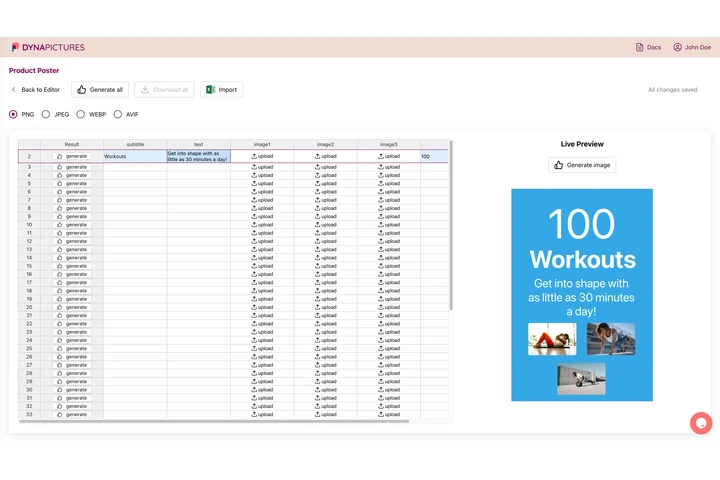
A cut-out product is the raw material of listing images, ads and sale banners, needed in every size and for every item in the range. In DynaPictures the photo drops into an image layer of your template at exact X and Y beside the name and price, and each row of your product spreadsheet becomes a finished image.
- One image per row of a product CSV
- Product photo placed at exact X and Y
- PNG, JPEG, WEBP or AVIF from one template
Background remover at a glance
- Price: free, no login, no watermark
- Daily limit: 10 photos per visitor; resets at midnight UTC
- Upload: one photo, JPG, PNG, WebP, AVIF or HEIC, up to 15 MB
- Result: a PNG with a transparent background, or the product on pure white as a JPG
- Size: the size of your photo, at most 2048 px on the long side, never enlarged
- Model: IS-Net (isnet-general-use), an open-source model run on DynaPictures servers
- Storage: the upload is deleted after the removal, the result after 24 hours
How to remove the background from a product photo
Upload the photo
JPG, PNG, WebP, AVIF or HEIC up to 15 MB. One product on a plain or tidy background gives the cleanest outline.
Choose the result
A transparent PNG for banners, ads and your own designs, or the product on pure white as a JPG for a marketplace main image.
Remove and download
The model separates the product from its background in a few seconds. Download the file while the link is valid, for 24 hours.
Why use this background remover for product photos
Crisp product outlines
The IS-Net model draws clean edges around shoes, bottles, boxes and logos and keeps holes such as a mug handle open.
Pure white in one click
Pick the white result and the product lands on RGB 255, 255, 255, the main-image background marketplaces such as Amazon ask for.
Phone photos welcome
HEIC and large JPGs up to 15 MB are accepted, turned the right way up from their camera data and returned at up to 2048 px.
Free, no login
10 photos a day per visitor, no account to create and no watermark on the result.
Your photo stays private
The removal runs on DynaPictures servers, not at a third-party AI service, and the upload is deleted as soon as it is done.
How the background remover works and where it struggles
An open-source segmentation model, IS-Net, looks at your photo at 1024 x 1024 pixels and rates every pixel as product or background. That mask is scaled back to the size of your photo and becomes its transparency. Glass, clear plastic and other see-through objects come out opaque, fine hair can keep a thin rim of the old colour, and shadows go with the background. Everything the model reads as the subject stays, so crop away a second product or a hand before you upload.
Free limits
10 photos per day per visitor, reset at midnight UTC. Uploads up to 15 MB, results kept for 24 hours.
Output
A PNG with an alpha channel, or a JPG on pure white, at the size of your photo up to 2048 px on the long side.
Privacy
The upload is used only for this removal and deleted right after it; the result is deleted after 24 hours.
Frequently asked questions
Yes. Every visitor can remove the background from 10 photos a day for free, with no login and no watermark; the limit resets at midnight UTC. Upload a JPG, PNG, WebP, AVIF or HEIC up to 15 MB and download the result, at up to 2048 px on the long side, within 24 hours.